Describe the event
Add the raffle name, date, venue or virtual-event information, and a description. Explain the main prize, drawing format, attendance expectations, and how supporters can contact the organizer.
Ticketing for reverse raffle organizers
Give supporters a sales page for your event and keep the resulting orders close to your ticket records. RRaffle connects online raffle ticket sales, event extras, and the drawing tools your team uses on the big night.
Online raffle ticket sales are included in The Works annual plan. Payment-account setup is part of getting your sales site ready.
Organizer setup
Tell supporters what they are buying and what happens next. Prepare the event details and check the purchase workflow before announcing sales.
Add the raffle name, date, venue or virtual-event information, and a description. Explain the main prize, drawing format, attendance expectations, and how supporters can contact the organizer.
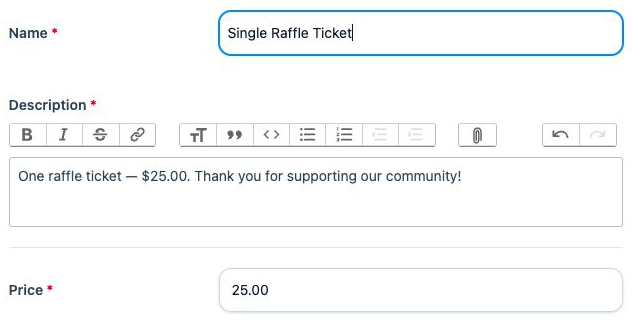
Set ticket product names, descriptions, prices, and availability. Use quantity limits where needed. Online raffle ticket sales currently use numbered ticket pools; custom ticket-code raffles do not support online raffle ticket products.
Offer items such as dinner or admission tickets as other sale items. Configure attendance choices or an item that requires another product when that matches your event. These extras do not automatically become entries in the main raffle.
Check product descriptions, available quantities, optional attendance choices, and contact fields. Confirm payment-account setup and make sure the published event rules match your raffle settings.
Explain what one purchase includes, whether it enters the raffle, and whether attendance or an extra item is included. Clear product descriptions help supporters choose the right quantity.
The supporter purchase

01 · Choose items
Supporters choose quantities on the raffle's sales page, make any available attendance selection, and provide their name and receipt email. A contact phone number is optional.
02 · Review and pay
The review page lists selected products, quantities, ticket prices, transfer fees, processing fees, and the total. Supporters can check that summary before continuing to payment.
03 · Complete the records
After a successful purchase, raffle tickets need their ticket-holder details completed. Keep the receipt and follow the ticket-detail instructions so the organizer has the information needed for the drawing and winner follow-up.
After the sale
Use order and ticket records together to prepare your fundraiser. Separate the number of raffle entries from the number of guests or meals so your team knows what each record represents.
Prepare the complete fundraiser
Choose the features you need, learn the organizer workflow, and decide how to run the drawing before ticket sales open.
See what Basic, Professional, and The Works include.
View plans →
Follow the practical guide from event rules to final records.
Read the organizer guide →
Sign in to download the guide for organizer tasks.
Organizer guide (sign in) →
More questions? Read the RRaffle FAQs or contact the support team linked below.